VisualCut:
VisualCut is used to drive roll based cutters which typically don't have a dedicated cut controller.
Common connections are through USB or Ethernet.
Following screenshots show common connections to popular cut models:
Graphtec FC8600 (Same applies to the FC7000/8000/9000):
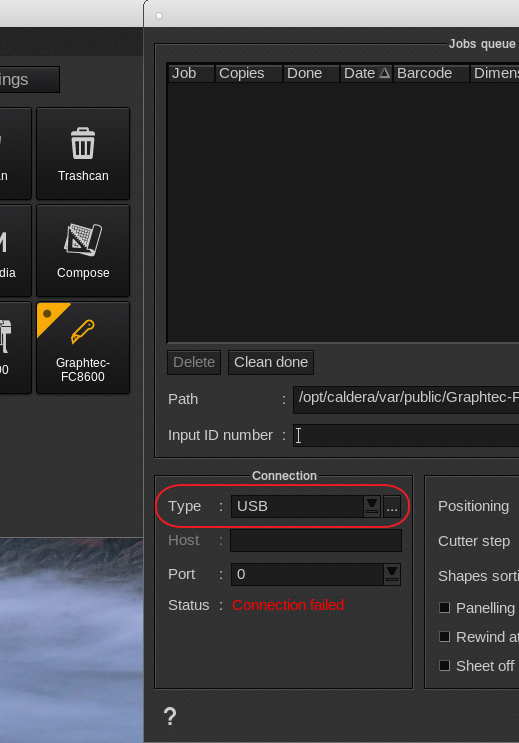
Connected via USB (is the default VisualCut connection):
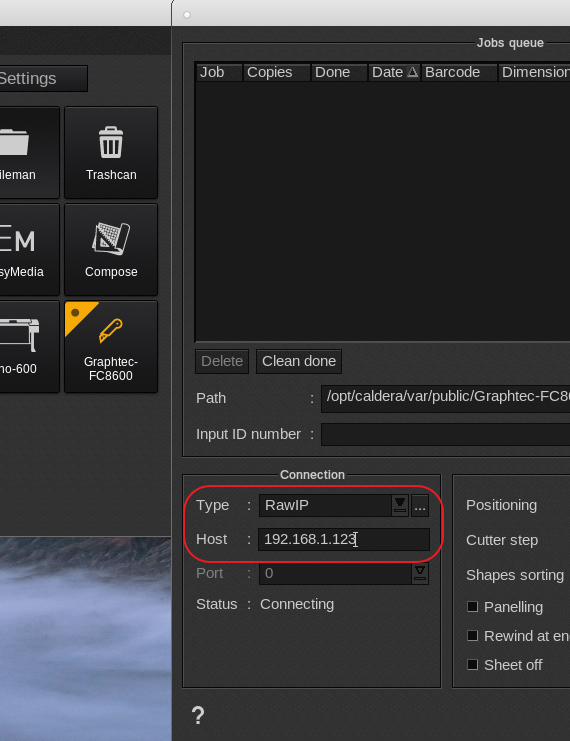
If the Graphtec has an Ethernet controller, then one selects Raw IP and in the host field the IP address is to be entered. Use the IP address without zero's so for example 192.168.001.005 should be entered as 192.168.1.5.
Also make sure you load media in the cutter as some cutters will not go online without this. Ensure the Caldera rip can get a clear ping to the cutters ip address. Following article explains the ping command:
How to check the network connection using the ping command.
Ethernet connection (Type: RAWIP and Host field contains the cutters IP address)
Summa roll based cutters like the Summa S2 (OPOS XY or OPOS barcode) exactly the same as the Graphtec USB or Ethernet connection.
Exception is the Summa cutters which support the OPOS CAM option. In this case the connection type in VisualCut is to be set to File.
More details on this setup can be found here Summa OPOS Cam
Common connection issues:
USB:
- Cable too long (limit the cable length to a maximum of 10 ft (3 meters).
- Multiple cutters of the same model on the same rip (not supported under an USB connection).
- Mac mini, use USB port closest to HDMI port.
- Use or do not use a powered USB hub. In some cases an USB hub works fine and could be a requirement but in other cases it works the opposite.
- Avoid other "uncommon" USB devices (like using the Mac or PC to charge a cell phone).
Ethernet:
- Incorrect IP address (make sure the operating system has good communication with the cutters IP address, use the Terminal ping command).
- Duplicate IP address (Turn cutter off and see if it still responds to a ping as it obviously should not).
- Not a clean ping but a ping with network time outs (check cabling, check network router/switches)
- Printers and cutters require a hard wired Ethernet connection so avoid at all times WIFI connections.