GrandCut is used to create registration, bar codes and cut files for flatbed cutters with a dedicated cut controller.
In general GrandCut connects to the network share of the cut controller. On some cut controllers there's also a regular IP address based connection.
Here's a common example of a Zund Cut Center setup. Other cutter models (iCut, Optiscout etc.) work on a similar basis at least using the shared folder setup.
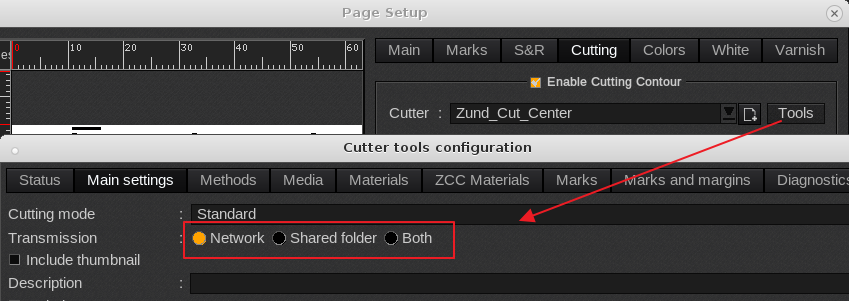
Zund Cut Center uses a shared folder, a network connection or both. The network connection is required to link Caldera media's to Zund materials and Caldera cutcontours to Zund Methods.
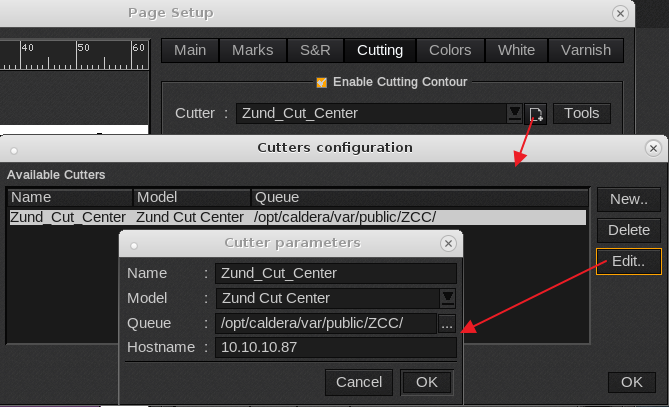
In the printer drivers page setup (drag and drop of file on any of the installed printers) one can access the Zund Tool settings:
Under the Hostname the IP address of the Zund Cut Center PC is to be entered (In this example the ip address is 10.10.10.87) and under the Queue you can enter the path to the folder storing the cut files. This folder doesn't have to be on the Zund Cut Center PC as the network connection can be used to submit cut files under Zund Cut Center. The cut queue is typically used when there's more than one Zund Cut Center PC in the shop. Then the cut queue is typically on a File server offering flexibility on which cutter to use.
In case of a Network only connection select "Network". Keep in mind that the network connection is required (even temporary) when the cut driver is being configured with the Media/Materials and Methods.
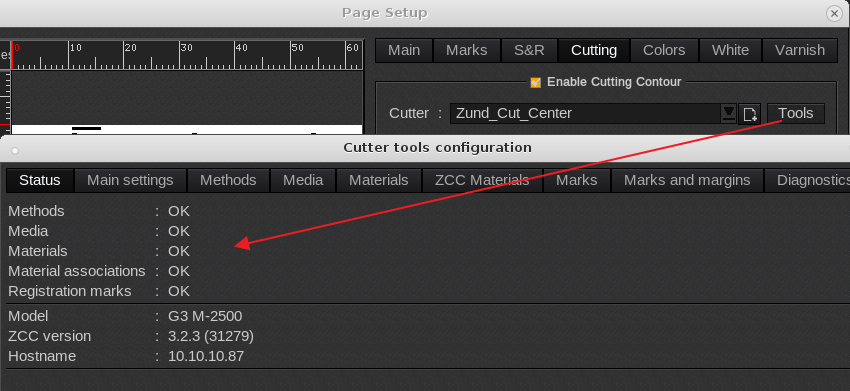
With a proper connected Zund Cut Center PC it should show the Model, ZCC Version and hostname.
If it's doesn't show this information use the ping command to check if the Zund Cut Center PC can be reached from the system hosting Caldera.
Here's how to use the ping command: How to use ping
When there's not a valid connection it the Tools window will open but very slow.
Following screenshot when the cutter is not detected:
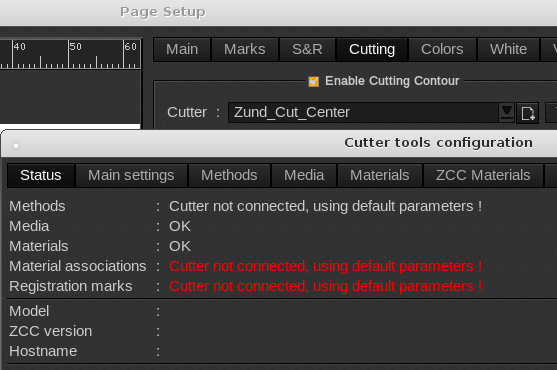
Common reasons:
- Zund Cut Center PC turned off.
- No ZCC ip address specified.
- Incorrect ZCC ip address specified
Keep in mind that once configured and using the shared folder option there's no need for a network connection.