Issue:
Printing banding issues
Problem:
Find below some information about the Roland Intellignet Pass Control ( RIPC) option that helps with banding issues.
Roland Intelligent Pass Control™ Technology
Solution:
To use the Roland Intelligent Pass Control, for the Roland XF640 for example, make sure that the following options are disabled, under the wrench icon of the print module:
- passmask pattern
- passmask overlap
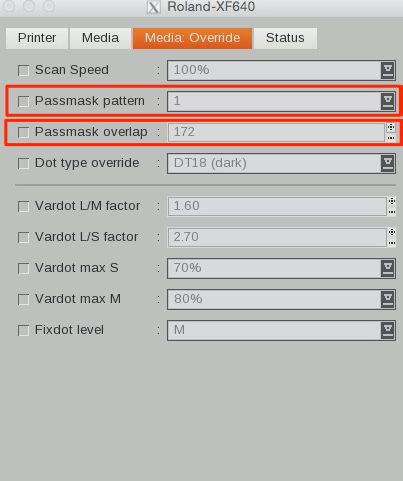
If the passmark options are disabled then the RIPC will be automatically enabled, when using a supported resolution that works with it:
- 540x360 4pass
- 360x720
- 720 (not fixed)
- 720X1440
These resolutions are specifically for Roland XF640
For other Roland printers that have this option (see link in top of mail) you may use it also with these resolutions:
- 360 3passes
- 540X360 3passes
- 360X720 (all except 2passes)
- 540x720
- 720 var dot (all except 2passes)
- 1440X720 fix dot
- 720X1080 6 passes slower
- 1080 var dot
- 1080x1440 fix and var dot
Be careful !!!
Roland VP-540 V10.2 or newer, missing qualities passmark parameter RIPC