About: Caldera is stuck at the initialization during installation and nothing is happening even after waiting for 30 minutes or more. Unable to install.
_____________________________________________________________________________
Step 1: Check to make sure the installation file is not corrupted.
- How to check MD5 Checksums
- If the installation file is good, proceed to step 2.
Step 2: Force quit Xquartz and the the installation Wizard will open.
- If step 2 fails, proceed to step 3.
Step 3: Reinstall Xquartz 2.7.9 and reboot the Mac and you should be able perform the installation successfully there after.
If the above steps won't work you might have to perform the following additional steps:
I some rare cases you might have to completely uninstall XQuartz: Caldera not opening, MacOS Xquartz troubleshooting. Reboot the computer after XQuartz was uninstalled. After reboot XQuartz 2.7.9 will have to be installed and the computer rebooted once again.
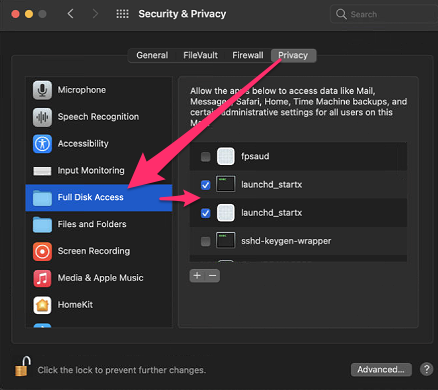
Note: You might also have to go to System Preferences -> Security & Privacy -> Full Disk Access -> and place a tick mark next to "launchd_startx" before the Caldera installer will work: