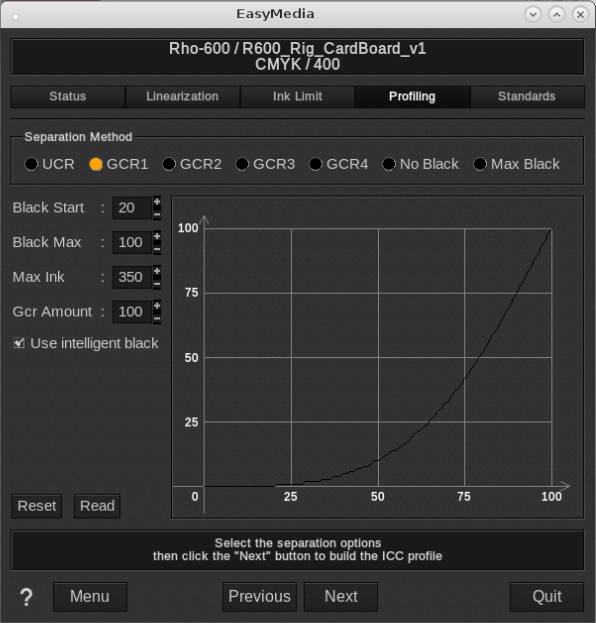
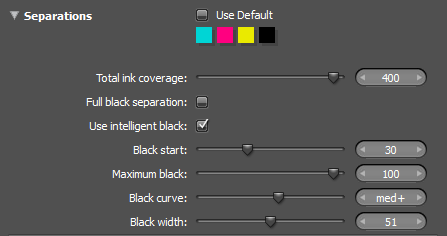
Caldera EasyMedia uses the i1Prism Color Engine and shares i1Profiler options:
The information below if from i1Profiler help function
(some functions have a slightly different names):
Black start
The Black start value determines at what lightness level that black will be introduced into the separation.
When the value is set to "0", black will be immediately available to the separation, and will result in the appearance of black in very light tones.
For printers that use light and very light black ink, it is recommended to use a low black start value. For printers using only a full strength black it is recommended to use a high black start value to prevent black from being used in the separation too early.
Negative effects of using a black start that is too low include: grainy highlight tones and pepper effect in skin tones
Maximum black (Black Max)
The maximum black value determines that maximum amount of black that will be used in the color separation.
In most cases, this value is left at 100%. In some high-speed printing and production applications, this value may be reduced slightly to reduce coverage effects associated with some printing technologies. Reducing this value can also force higher coverage of CMY and other inks into the reproduction of darker colors.
Black curve (Separation Method)
The black curve determines how black is used when separating shades of black (a.k.a. grays).
It is often the case that the blackest black of your printer is built from black ink, as well as some amount of CMY, or other inks. The black curve describes how black is used in building a ramp from the paper color, to the blackest black.
Imagine a gray ramp that goes from white (the paper color) to the blackest black of your printer and media combination. At 0% (the paper color), no ink is used. At 5%, a light coverage of ink is used. It may be CMY. It maybe be K (black).
The black curve, in combination with the black start and maximum black values, determines how black will be used throughout the separation of a gray ramp.
Black width (GCR Amount)
When making separations, black is typically used in the reproduction of grays and de-saturated colors. However, black may also be used to reproduce more saturated colors and can even extend the range of saturated color that your device can produce.
The increasing black width control slider increases the use of black when separating saturated colors. Decreasing the slider restricts use of black in the separation to more
de-saturated colors and grays.
Use intelligent black
This setting protects the gamut of your printer. When enabled, intelligent black may override the specified black curve to ensure availability of black to areas that need it when building the color separation.
Using advanced analysis tools to evaluate the profile, you may see that intelligent black produces a black shape that is slightly different than the one you specified in i1Profiler. To restrict i1Profiler to the user-specified black curve shape, deselect use intelligent black.
X-Rite recommends leaving intelligent black enabled.
Caldera support has noticed that this option can cause unwanted issues which customers attribute to course screening. On HP-Scitex models this option is disabled on HP's request. So when troubleshooting coarse looking prints (typically black pattern visible in sold colors then disable Intelligent Black).