Network shares not mounted upon boot. This assumes that the shares will mount fine when opening a terminal and by typing sudo mount -a (password is caldera).
This doesn't apply to Debian 8.6 (only Caldera Debian 1.x and 2.x).
Network services not ready when /etc/fstab is being executed
Add your mount –a command in the Caldera startup script as this script runs after the /etc/fstab and allows more time for the network services to become ready
So add
mount -a
in /etc/init.d/caldera
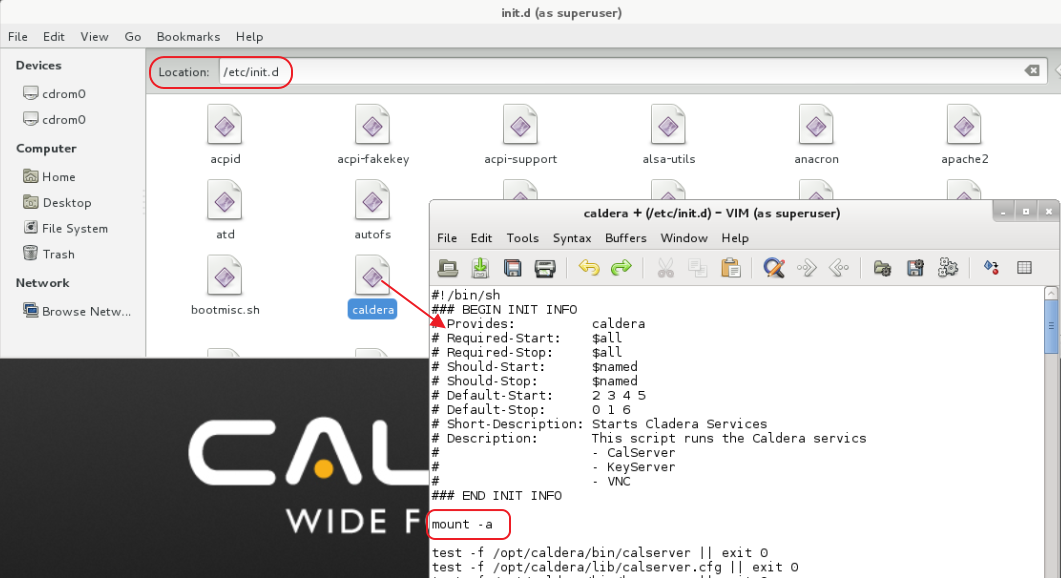
This is the Caldera startup script which is executed after the /etc/fstab.
You can use Caldera Tools (file manager with administrative rights) to browse and edit using one of the GUI editors (right click the Caldera text file) the /etc/init.d/caldera text file.
-----------------
For newer Debian/Caldera versions the same can be done but then by editing:
/opt/caldera/lib/service-init-d