If you have tried to create a folder in Debian Linux and share it on Windows but failed, it may be due to the folder-sharing settings. If that's the case, then you must add some information to the SMB.CONF file.
Just follow the steps below:
1. Open a terminal in Administrator mode: -sudo -s and then enter the password "caldera"
2. Create the folder you want to share: mkdir /home/Test (creating, in this example, a folder called "Test")
3. Go to /etc/samba (by typing cd /etc/samba)
4. Edit samba.conf
5. Go to the end of the file and add the Test folder information:
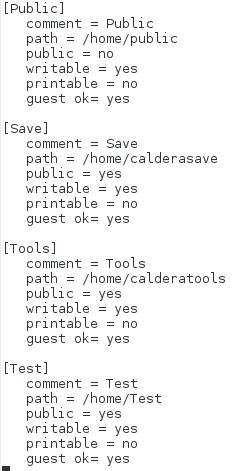
6. Finally, save the file and you are done.