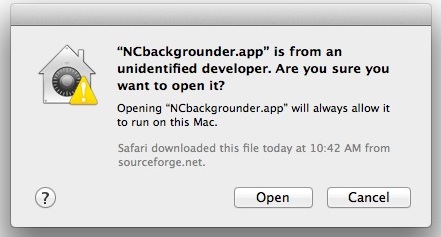
When installing Caldera on Mac on OSX Mountain Lion or later, you recieve the error "Install Caldera.app can’t be opened because it is from an unidentified developer".
Gatekeeper is preventing the install.
Since OS X Mountain Lion, the Mac defaults to preventing applications from unidentified developers or sources from being launched. You’ll discover the message in OS X 10.8 when you try to launch a Mac app that didn’t come from a verified source or from the Mac App Store, and you’ll get an alert dialog that says “Install Caldera.app can’t be opened because it is from an unidentified developer”.
App Can't be Opened from Unidentified Developer warning
This new security feature is called GateKeeper, and it doesn’t mean you can’t run those unverified apps on the Mac, you just have to either temporarily skirt the security blanket of GateKeeper, or turn off the app limitations entirely.
Temporarily Get Around “App Can’t Be Opened” Gatekeeper Alert Message
This is probably the best option for most users, since it maintains some security:
Right-click (or control-click) the application in question and choose “Open”
Click the “Open” button at the next dialog warning to launch the app anyway
You can do this with any third party app that gives you this warning dialog and open it anyway.
Temporarily get around the App Cant Be Opened message in Mac OS X
If you get tired of constantly right-clicking apps to open them, return to pre-MountainLion levels of app security by turning off Gatekeepers app verification completely.
Disable GateKeeper’s Unidentified App Developer Prevention Completely
This is generally best for advanced users who know what apps to trust and not to trust:
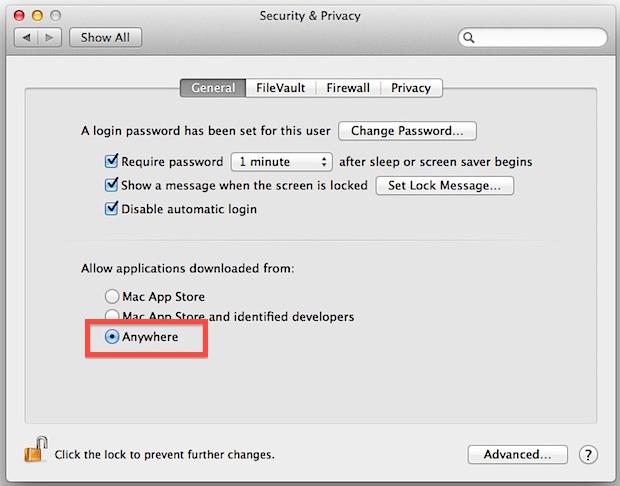
Launch System Preferences from the Apple menu
Choose “Security & Privacy” and then click the “General” tab, followed by clicking the lock icon in the corner to unlock the settings
Look for “Allow applications downloaded from:” and choose “Anywhere”
Accept the security warning and allow
You can now launch any app from any location or developer: