Symptom:
In the Bios of the Variable Display, there are two things that can be set:
- the automatic start of the Variable Display when power is "On". (This will help to start the VD if there is a power outage. This option is usually set by default.)
- the scheduled manual start of the VD. (It's possible to set that you wish to have the VD start itself at a specific hour.)
Problem:
To access the Bios on the VD, you have to:
1) Connect a keyboard on the VD.
2) Start the VD and press the key DELETE or DEL on the keyboard until the Bios appears.
3) To modify the power management settings, go to the tab "POWER".
4) Go then to the "APM Config" setting.
Solution:
I) To activate the automatic start of the Variable Display when it's plugged to power, enable the first and third options:
a) The first option "Power on PME" has to be set to "Enabled". A third option will then appear in the menu.
b) The new option, the third one, has to be set on "Power On".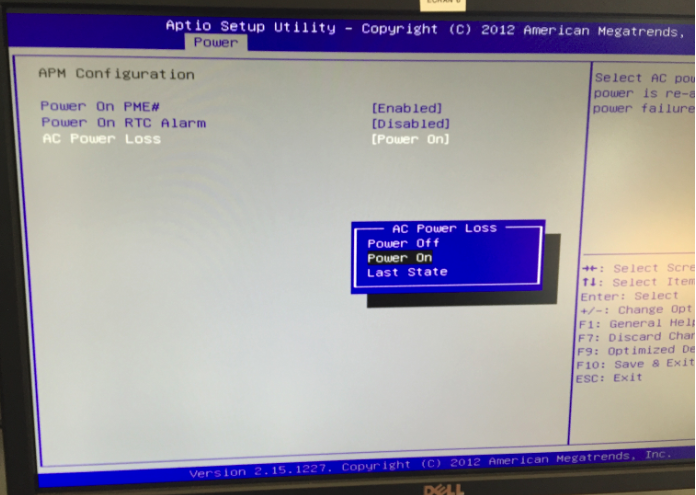
II) To schedule the automatic start of the Variable Display at a specific time you have to use the option "Power On RTC Alarm".
When you enable it, four more lines will appear:
- Date: set it to "0" so it's for everyday.
- Hour, Minutes, Seconds: indicate the time when the Variable display should start itself.
You then save and validate the Bios settings by pressing F10 and then validating with Yes.
The Variable Display will then restart.