Usually a disconnect between Caldera printer driver and printer.
Resolution:
Check if you can ping printer, access printer based web browser (if available) to check network connection.
How to check a network connection using ping
______________________
Check if IP is within private networking range, https://en.wikipedia.org/wiki/Private_network
______________________
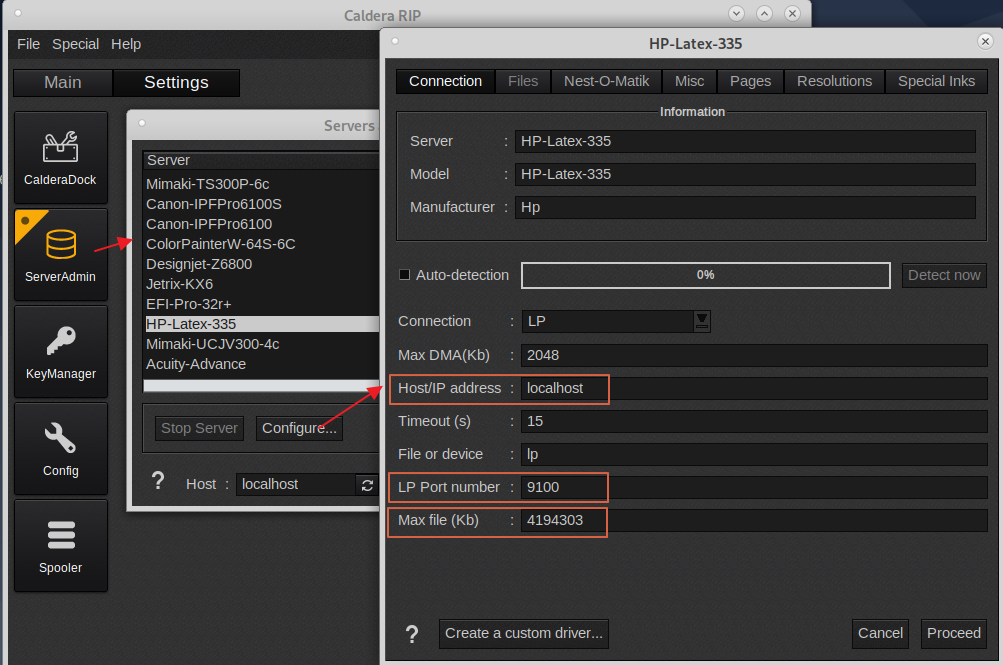
Check Server Admin printer settings like ip address, port number, max file size (for unknown reasons the port and max file size might be incorrect).
Example of a printer connected with the LP protocol with the correct port/max file settings (localhost to be replaced by the printers ip address).
______________________
The ip address format is to omit zero's before a number. So for example 192.168.001.020 is to be entered in Caldera as 192.168.1.20.
______________________
Check for more recent printer driver. Up to date printer drivers are available for download on the WorkSpace
______________________
Check if printer is not driven by another rip at the same time. Some printer models especially LP or RAW IP printers allow only one connection at a time