Fujifilm Acuity LED 3200R - Additional information
Network communication
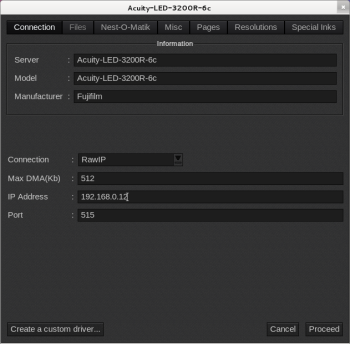
This model supports Ethernet communication for printing: select RAWIP in the ServerAdmin module for this printer, and enter its IP address.
Modifying the port will have no effect on the communication, the communication port used are fixed in the driver for this model.
Requirements
In order to work, the network configuration must be Gigabit compliant. Please check following points:
- You have to select RAWIP connection in ServerAdmin, and put the IP address of the printer. The port doesn't matter, it's fixed in the driver.
- You have to check that all devices from the RIP computer to the switch in between, supports Gigabit connection. (10/100 switch not compatible)
- You have to check that all RJ45 cable between the RIP station and the printer (including the link between RIP and switch), must be category 6 cable (Gigabit connection compatible)
- Anytime a network change is made on the printer, the printer requires a reboot for the change to take effect.
- After rebooting the printer or the network, Ethernet communication might not work. Open the network settings on printer panel and then turn it back into remote mode
In case of trouble, please try to connect the Caldera RIP station directly with the printer using a category 6 RJ45 cable, and setting fixed IP address. If working, the initial connection problem might be an incompatible cable or hardware or a defective switch port.