This article provides an overview of the three menus available in the ImageBar: the Tabs Menu, the Images Menu, and the Tasks Menu, which is a sub-menu within the Images Menu. Each menu plays a role in improving your workflow and managing your images effectively.
Tabs Menu
To display the Tabs Menu select a tab and right-click on it:
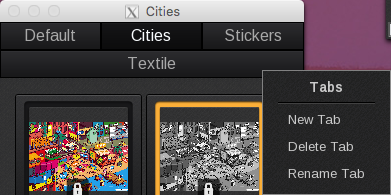
- New Tab: Creates a new tab.
- Delete Tab: Deletes the current tab. If there are images within this tab, you have the option to move them to the Trash, move them to another tab, or delete them.
- Rename Tab: Renames the current tab.
Images Menu
To display the Images Menu, select a thumbnail image in the ImageBar and right-click on it. If no thumbnail image is selected when you right-click in the ImageBar, certain features may be unavailable.
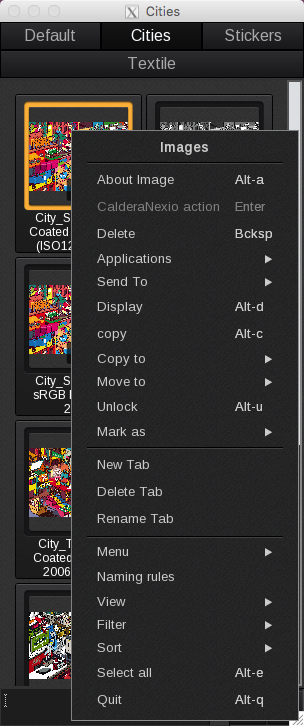
- About Image: Opens the Info module for the image. This module displays general, ICC, misc., spot colors, contours, comments, and job ticket information.
- Flow / Action: Unsupported option.
- Delete: Deletes the image and moves it to the Trash.
- Applications: Opens the image in the module you select.
- Send to: Sends the image to a running Workflows or Print Configuration.
- Display: Opens the image in the Display module.
- Copy: Creates a copy of the image and saves it to the current tab in the ImageBar.
- Copy to: Creates a copy of the image with the option to save it to a different tab in the ImageBar.
- Move to: Moves the image from the current tab to the tab you select from the list.
- Unlock: Unlocks the image.
- Mark as: Marks the image with the job status as Done or Undone.
Tasks Menu
To display the Tasks Menu, simply right-click in the Image Bar. There is no need to select an image thumbnail beforehand.
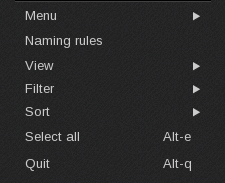
- Menu: Moves the File, Special and Help tabs so they appear in either the ImageBar or ApplicationBar.
- Naming rules: Opens the Image Naming Rules window, where you can configure the global parameters for how images are created and named in the Compose module. For instance, you can modify the default name assigned to new images. This includes changing the naming convention from “Untitled_%” to “img_%” or any other default name you prefer for your images.
- View: Lists view options for your images.
- Filter options: Lists image filter options.
-
Sort: Lists image sort options. Sort options are:
- By Name: Sorts ascending by file name.
- By Size: Sorts ascending by file size.
- By Date: Sorts ascending by file date. (This is the default for sort)
- Select All: Selects all the images in the active tab.
- Quit: Closes all open modules and quits the software.