The Misc tab is divided into two sections: File contents and Embedded images.
File contents

The File contents section displays information about certain elements contained into the file.
-
- Number of vectors: lists number of vectors that are embedded in the file.
-
- Number of images: displays how many raster images are embedded in the file.
-
- File has overprint: indicates if the file has an overprint in it.
Embedded images
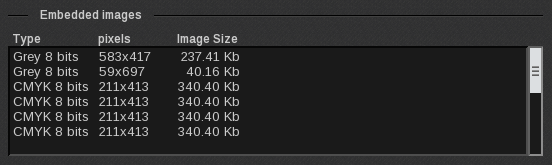
The Embedded images section displays more in-depth information about the Embedded images.
-
- Type: color mode and depth of the image’s colors (in bits).
-
- Pixels: size of the image in pixels
-
- Image Size: storage space used (in bytes) by the image.