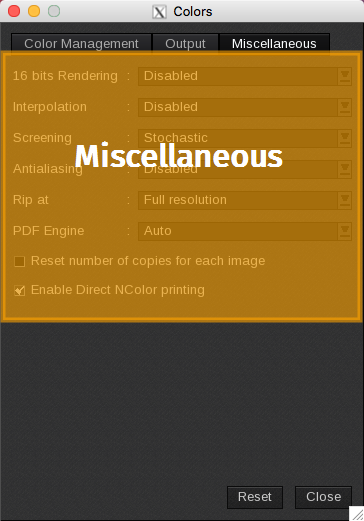
The Miscellaneous tab manages other elements related to color management, including rendering, screening, etc.
- 16 bits Rendering: Helps to resolve banding issues in gradients, especially for large jobs. When enabled, it slows down the RIP by approximately a factor of 1.5.
- Interpolation: This feature is used to resample raster images and mitigate pixelization effects. It is effective primarily with large rescaling factors and can slow down the RIP by approximately 2 to 3 times for raster files (such as TIFF and JPEG) and by 5 to 6 times for PS/PDF files.
-
Screening. Three screening options are available:
- Stochastic: This is the default option, offering fast performance with good quality..
- Adaptive Error Diffusion: Provides better quality but operates more slowly; particularly useful for printing text, maps, and lines.
-
Rosettes: This screening option is designed for PS/EPS/PDF files, enhancing print quality by utilizing a rosette pattern for smoother gradients and finer details. However, it may slow down processing compared to other screening methods.
The “rosettes” screening option was removed from CalderaRIP starting with version 19 because it was exclusively compatible with the Ghostscript interpreter, which was also discontinued in that version.
- Antialiasing: Antialiasing can be applied to vectors only, text only, both, or globally. While it improves visual quality, it also slows down the RIP. The global setting activates a more advanced algorithm that, while offering superior results, is approximately 3 to 4 times slower than RIP without antialiasing.
- RIP at: This setting allows the PS/PDF engine to operate at full resolution or at reduced resolutions of 1/2, 1/3, or 1/4.
-
PDF Engine: This option selects the engine used for ripping PDF files. The Auto setting utilizes the same engine as the one used for file previewing in the FileMan module, with Adobe PDF Print Engine as the default engine. GhostScript can also be selected.
The "PDF Engine" field previously allowed users to select either APPE or Ghostscript in earlier versions of CalderaRIP. However, starting with version 19, the field was removed and only Adobe PDF Print Engine is available as the default interpreter.
- Reset Number of Copies for Each Image: When enabled, this option resets the number of copies to 1 each time a new image is added to the Print module.
-
Enable Direct NColor printing: This option influences how the print driver processes files eligible for Direct NColor Printing. When enabled, eligible files are printed by directly mapping input channels to output channels, bypassing both ICC conversion and the CMYK to NColor conversion.
Info
A file is considered eligible when it contains extra channels that match the names of the additional process inks. For instance, a TIFF file with extra channels named “Orange” and “Green” qualifies for CMYKOG.
Similarly, a PDF file with spot colors named “Orange” and “Green” can also be eligible for CMYKOG, provided that you enable spot rasterization in the Fileman module.