Mimaki JFX200-1213 EX - Overview
Updated
Supported model
Mimaki JFX200-1213 EX
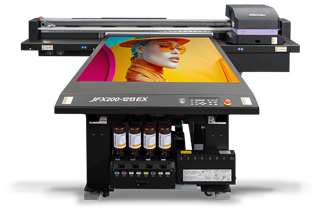
- Middle-size flatbed UV printer
- Maximum print area: 1,270 x 1,300 mm (50.0 x 51.2")
- This printer supports various types of UV-curable ink with 4 or 6 ink sets
Drivers
- Mimaki-JFX200-1213EX-4c
- Mimaki-JFX200-1213EX-6c
Driver history
-
CalderaRIP V19.2:
- The printer has been supported since this version.
Resolution and Quality
4C Driver
|
|
- 8 Pass Bi
- 8 Pass Uni (Default)
|
|
|
- 12 Pass Bi
- 12 Pass Uni (Default)
|
|
- 8 Pass Bi High Speed
- 8 Pass Uni High Speed
- 8 Pass Bi
- 8 Pass Uni
|
- 16 Pass Bi High Speed (Default)
- 16 Pass Uni High Speed
- 16 Pass Bi
- 16 Pass Uni
|
|
- 12 Pass Bi High Speed
- 12 Pass Uni High Speed
- 12 Pass Bi
- 12 Pass Uni (Default)
|
- 24 Pass Bi High Speed
- 24 Pass Uni High Speed
- 24 Pass Bi
- 24 Pass Uni
|
|
- 16 Pass Bi High Speed (Default)
- 16 Pass Uni High Speed
- 16 Pass Bi
- 16 Pass Uni
|
- 32 Pass Bi High Speed
- 32 Pass Uni High Speed
- 32 Pass Bi
- 32 Pass Uni
|
6C Driver
|
- 8 Pass Bi
- 8 Pass Uni (Default)
|
|
|
- 12 Pass Bi
- 12 Pass Uni (Default)
|
|
|
- 16 Pass Bi High Speed (Default)
- 16 Pass Uni High Speed
- 16 Pass Bi
- 16 Pass Uni
|
- 32 Pass Bi High Speed
- 32 Pass Uni High Speed
- 32 Pass Bi
- 32 Pass Uni
|
|
- 24 Pass Bi High Speed (Default)
- 24 Pass Uni High Speed
- 24 Pass Bi
- 24 Pass Uni
|
- 48 Pass Bi High Speed
- 48 Pass Uni High Speed
- 48 Pass Bi
- 48 Pass Uni
|
|
- 32 Pass Bi High Speed (Default)
- 32 Pass Uni High Speed
- 32 Pass Bi
- 32 Pass Uni
|
- 64 Pass Bi High Speed
- 64 Pass Uni High Speed
- 64 Pass Bi
- 64 Pass Uni
|
Mode
|
4C Driver |
6C Driver |
 Cyan Cyan |
✔ |
✔ |
 Magenta Magenta |
✔ |
✔ |
 Yellow Yellow |
✔ |
✔ |
 Black Black |
✔ |
✔ |
 Light Cyan Light Cyan |
|
✔ |
 Light Magenta Light Magenta |
|
✔ |
These drivers can use white, varnish, and primer as Spot Inks. To configure them, go to the Page Setup module:
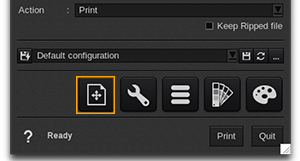
Then open the corresponding tab, click Enable separation, and select the Method that matches your production needs.
Connection
You might be interested in reading: Best practices for the USB communication of Mimaki devices.