Articles in this section

How to force cut rotation for sublimation and lamination workflows


Info - This feature is a CalderaCare feature. It is available from CalderaRIP V15.1.


You can rotate the cut jobs by 180° to match rolling/unrolling 2 steps workflows like sublimation or lamination.


VisualCut

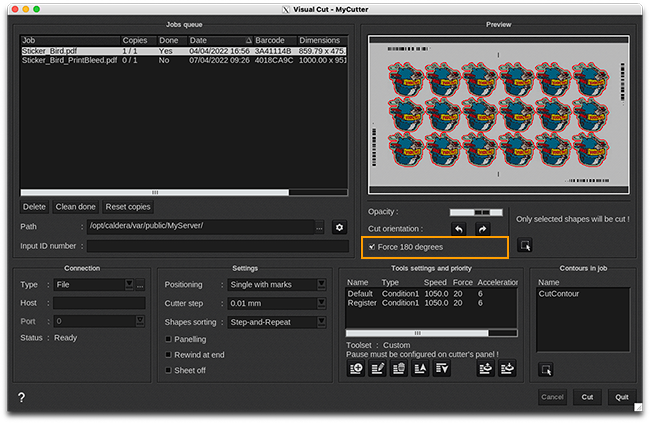
For all VisualCut cutters, select Force 180 degrees checkbox.
mceclip1_650px.png


GrandCut

For the following list of GrandCut drivers:

  • Blackman and White
  • Caldera XML
  • Elitron
  • Generic DXF 
  • HiSeiki
  • IEcho
  • Jingwei
  • Matic Helios Plus
  • MCT
  • Oce ProCut
  • OptiScout
  • OptiScout Connected
  • SinaJet
  • Summa Dual cutters
  • Summa GoProduce
  • Summa L1810
  • Summa L3214
  • SummaFlex
  • SummaFlex Connected
  • TigerVision
  • TPS
  • Valiani
  • Veloblade
  • Verso
  • Zund Cut Center
  • Zund Cut Center 3


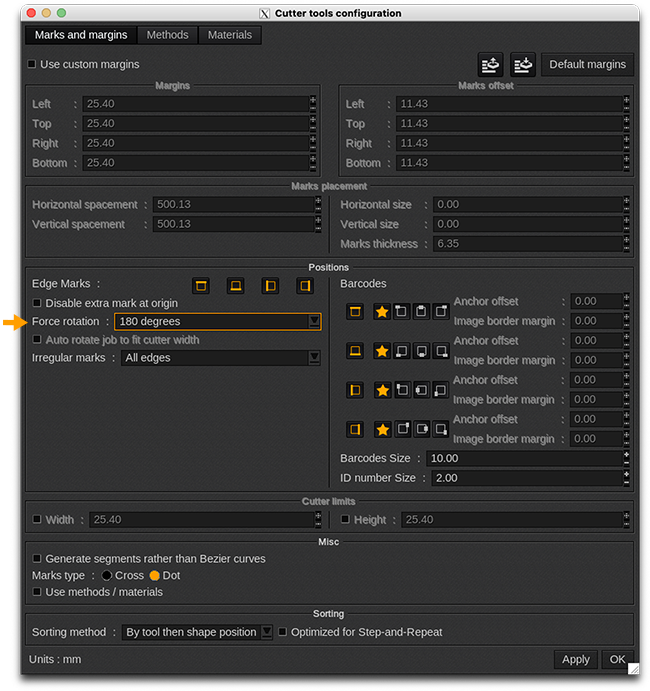
From cutter tools configuration in PrintClient, select Force rotation drop-down to 180 degrees.
mceclip0_650px.png

Was this article helpful?
1 out of 1 found this helpful