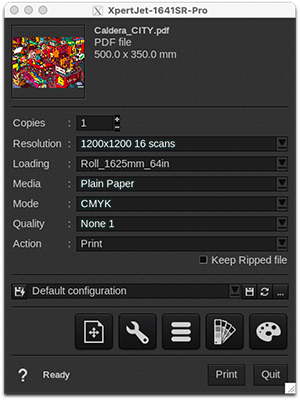
Resolution
These controllers have several resolutions and pass options to choose from. Note that for each available resolution, you can opt for a variable drop or a fixed drop (-Fix):
| Mutoh XpertJet 1341SR Pro and 1641SR Pro* | ||
|
|
|
*Direction is always bidirectional with a speed of 360 cps.
| Mutoh XpertJet 1641SR** | ||
|
|
|
**Direction can be unidirectional or bidirectional. The speed varies between 2 values: 320 or 460 cps. The Dot Family might also vary between 3 sets or auto.
Loading
1341SR Pro and 1641SR Pro
|
|
1641SR
|
|
|
|
Media
- Plain paper (default)
These drivers come with only a default media not calibrated.
Discover how to manage media with EasyMedia by clicking here.
Modes
- CMYK
Qualities
|
|
|
Recommended settings (for the Pro models/drivers)
|
Actions
Available actions are:
- Print: This action rips and prints the file simultaneously.
- RIP: Rips the file and holds it in the Spooler.
- RIP then Print: Rips the entire file, and then sends the file to print.
- Nest: This action nests all images sent to the printer and holds them in the Spooler.
Keep Ripped file (only available with "Print" and "Rip then Print" actions). When this box is checked, the sent file remains in the Spooler so you can reprint the job later on.