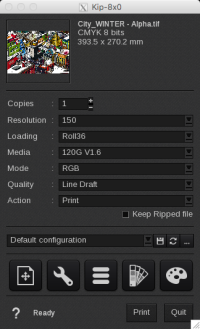
Resolution
The printer supports the following graphic resolutions: 150, 300, 300-90 LPI, 300-120 LPI, 300x600, 300x600-90 LPI, 300x600-120 LPI, 600, 600-90 LPI, and 600-120 LPI.
Loading
- Roll36, 34, 30, 24, 22, 17
- A4, A3, A2, A1, A0
- Custom (...)
EasySelect is the capability for CalderaRIP to use the size and type of loaded media in the printer.
This printer supports 1 level of selection:
- CustomLoading: uses a custom size (sheet or roll) defined at last moment in the Print module interface.
Media
The “With Profiles” driver includes some pre-calibrated media. If you need to calibrate your own media, do so in the EasyMedia module.
Modes
Info
Printer driver(s) compatible with Custom Inksets. For more information, partners and resellers should consult the Partners Portal; end users can find details on our website.
Good to know
If a profile is saved, the default mode is that of the first media profiled. If no profile is saved, the default mode will be the first one in the list.
The printer supports the following 8-bit modes:
- Gray
- RGB
- CMYK
Qualities
LPI resolutions have two available qualities: Line Screen and Round Screen.
The following table represents the available Qualities for non-LPI resolutions:
| Line Draft | Graphic Draft | Photo Draft |
| Line Normal | Graphic Normal | Photo Normal |
| Line Quality | Graphic Quality | Photo Quality |
Actions
Available actions are:
- Print: This action rips and prints the file simultaneously.
- RIP: Rips the file and holds it in the Spooler.
- RIP then Print: Rips the entire file, and then sends the file to print.
- Nest: This action nests all images sent to the printer and holds them in the Spooler.
Keep Ripped file (only available with "Print" and "Rip then Print" actions). When this box is checked, the sent file remains in the Spooler so you can reprint the job later on.