Printer
-
TIFF Compression: Choose between LZW
compression of the TIFF file or None.
Info
Lempel-Ziv-Welch (LZW) is a fast and very efficient compression algorithm, best suited for upscaled images where many pixels have the same colors.
- Roll Destination: choose between Auto, Roll 1 or Roll 2.
Media
-
Information: at the top of the window, you are able to see information about your media. There you have access to two actions:
- Save: when you click on this button, the current media settings are saved to the selected media profile (printer, media, resolution, mode) so there will be applied for any new job using the same print configuration. If you don't save, the changes you made are only applied to the current job.
- Reload: will revert back to default as set during profiling or the last saved changes.
- Horizontal compensation (%): we recommend not to modify this. Any deviation is likely to be mechanical on the printer's side.
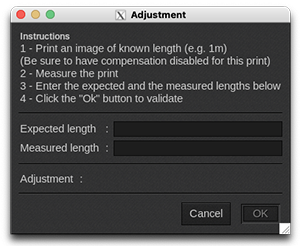
- Vertical compensation (%): this can be useful if you detect an increase or decrease in the length due to heating or media tension which is common when printing on vinyl or textiles for example. To calculate the compensation, click Compute and follow the software’s instructions.
Advanced parameters
- Category: media category on the controller.
- Generic Name: media name on the controller.
- Generic ID: media identification number on the controller.
- Donor ID: identification number of the parent media.
- Optimized for lamination: disable the printer's overcoat process.
Comments
On this tab you can see comments coming from the EasyMedia module. It can include comments from the global media window and from the profile project window.
Status
-
Status: global state of the printer:
- Ready
- Not available
All data is coming from the printer, if it is not available, nothing can be displayed.
- Media: not available
- Misc: not available
- Refresh: button to refresh the tab.