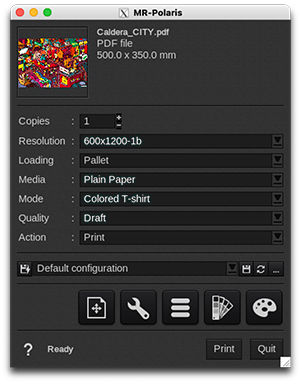
Resolution
| 600x1200 | 600x1800 |
|
|
| Info - With this driver, jobs should normally be submitted using the "-Contone" resolutions. The printer's internal workflow will automatically use the "-1b" and "-2b" resolutions as required. | ||||
Loading
- Pallet (default: 38 x 48.25 cm / 15 x 19 inch)
- Custom
EasySelect
EasySelect is the capability for CalderaRIP to use the size and type of loaded media in the printer.
This printer supports 1 level of selection:
- CustomLoading: uses a custom size (sheet or roll) defined at last moment in the Print module interface.
Media
- Plain paper (default)
This driver comes with only a default media not calibrated.
Discover how to manage media with EasyMedia by clicking here.
Mode
- CMYK: used for printing white garments (where no white ink is used), or for advanced configurations with manual white underbase generation.
-
Black T-shirt / Colored T-Shirt: both modes generate white ink underbase automatically, optimized for the artwork.
- "Black T-shirt" will only use the garment color for black areas with no black ink,
- whereas "Colored T-shirt" will also use black ink.
- White: this printing mode is not generally intended for manual use (it is used internally by the press, to generate the white print data).
Quality
- Draft
- Production
- Quality
- Heavy Ink
Actions
These printers support only two actions:
- Nest
You can not use "Rip" or "Rip then Print" actions and there is no "Keep the ripped file" option with these printers, as the "Print" action sends a RIP file onto the controller mounted directory. So you can keep those files on the controller and manage to reprint them on the controller directly.