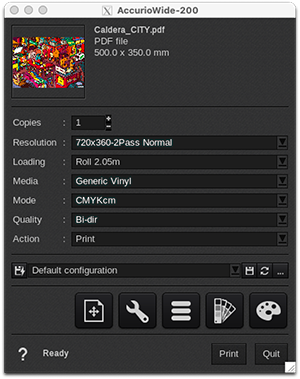
Resolution
- 720x360-2Pass Normal
- 720x360-2Pass Quality
- 540x1080-3Pass Normal
- 720x720-4Pass Normal
- 720x720-4Pass Quality
- 720x1080-6Pass Normal
- 720x1080-6Pass Quality
- 720x1440-6Pass Normal
- 720x1440-6Pass Quality
Loading
- Roll 1600 mm (only on AccurioWide 160)
- Roll 2.05m (only on AccurioWide 200)
- Custom
Custom Loading with EasySelect
EasySelect is the capability for CalderaRIP to use the size and type of loaded media in the printer.
This printer supports 1 level of selection:
- CustomLoading: uses a custom size (sheet or roll) defined at last moment in the Print module interface.
Media
- Generic Vinyl
This driver comes with only a default media not calibrated.
Discover how to manage media with EasyMedia by clicking here.
Mode
- CMYK
- CMYKcm
Quality
- Bi-Dir
- Uni-dir
- Bi-Dir Double Strike
- Uni-Dir Double Strike
Double Strike: each dot is fired twice, and multiply the resolution passes by 2, which can lead to a theoretical 200% density compared to the original qualities.
Action
The device supports only two actions:
- Print.
- Nest.
"Rip", "Rip then Print", and "Keep the ripped file" actions are disabled, as the "Print" action sends a RIP file to the controller-mounted directory. You can keep RIP files in the controller and manage to reprint them on the controller directly.