Epson Precision Dot CMYKcmkORMs (see next chapter)
Resolutions and Qualities
Warning
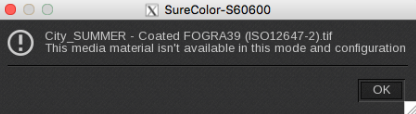
Depending on the Reference Media selected for your media, certain resolution-quality pairs may not be supported. If you select a pair that is incompatible, the following pop-up will appear:
Epson Precision Dot CMYK Resolution-Quality
Paper/others, Textile, Adhesive Vinyl & Canvas
9 colors mode
10 colors mode (with White)
10 colors mode (with Metallic)
720x720 dpi-4 Pass
720x720 dpi-6 Pass
720x720 dpi-8 Pass (default mode)
720x720 dpi-8 Pass High Quality
720x1440 dpi-12 Pass
720x1440 dpi-16 Pass
720x720 dpi-8 Pass Wh
720x720 dpi-8 Pass High Quality Wh (default mode for 1 layer)
720x1440 dpi-12 Pass Wh
720x1440 dpi-16 Pass Wh
720x1440 dpi-18 Pass Wh_2L
720x1440 dpi-32 Pass Wh_2L (default mode for 2 layers)
720x1440 dpi-20 Pass Ms (default mode for 1 layer)
1440x1440 dpi-36 Pass Ms
720x1440 dpi-40 Pass Ms_2L(default mode for 2 layers)
1440x1440 dpi-72 Pass Ms_2L
Film Frontlit & Film Backlit
9 colors mode
10 colors mode (with White)
10 colors mode (with Metallic)
720x720 dpi-8 Pass
720x1440 dpi-12 Pass
720x1440 dpi-16 Pass (default mode)
720x1440 dpi-30 Pass
720x1440 dpi-48 Pass
720x720 dpi-8 Pass Wh
720x1440 dpi-12 Pass Wh
720x1440 dpi-16 Pass Wh (default mode for 1 layer)
720x1440 dpi-30 Pass Wh
1440x1440 dpi-48 Pass Wh
720x720 dpi-18 Pass Wh_2L
720x1440 dpi-32 Pass Wh_2L (default mode for 2 layers)
1440x1440 dpi-48 Pass Wh_2L
720x720 dpi-27 Pass Wh_3L_2Way
720x1440 dpi-48 Pass Wh_3L_2Way(default mode for 3 layers with 2 Colors)
1440x1440 dpi-72 Pass Wh_3L_2Way
720x720 dpi-27 Pass Wh_3L_1Way
720x1440 dpi-48 Pass Wh_3L_1Way (default mode for 3 layers with 2 White)
1440x1440 dpi-72 Pass Wh_3L_1Way
720x1440 dpi-20 Pass Ms (default mode for 1 layer)
1440x1440 dpi-36 Pass Ms
720x1440 dpi-40 Pass Ms_2L(default mode for 2 layers)
1440x1440 dpi-72 Pass Ms_2L
Banner
9 colors mode
360x360 dpi-1 Pass
360x720 dpi-2 Pass
720x720 dpi-4 Pass
720x720 dpi-4 Pass High Speed
720x720 dpi-5 Pass
720x720 dpi-6 Pass (default mode)
720x720 dpi-8 Pass
720x720 dpi-8 Pass High Quality
Loading
EasySelect is the capability for CalderaRIP to use the size and type of loaded media in the printer.
This printer supports 2 levels of selection:
CustomLoading: uses a custom size (sheet or roll) defined at last moment in the Print module interface.
AutoLoading: uses the size of the media currently loaded in the printer.