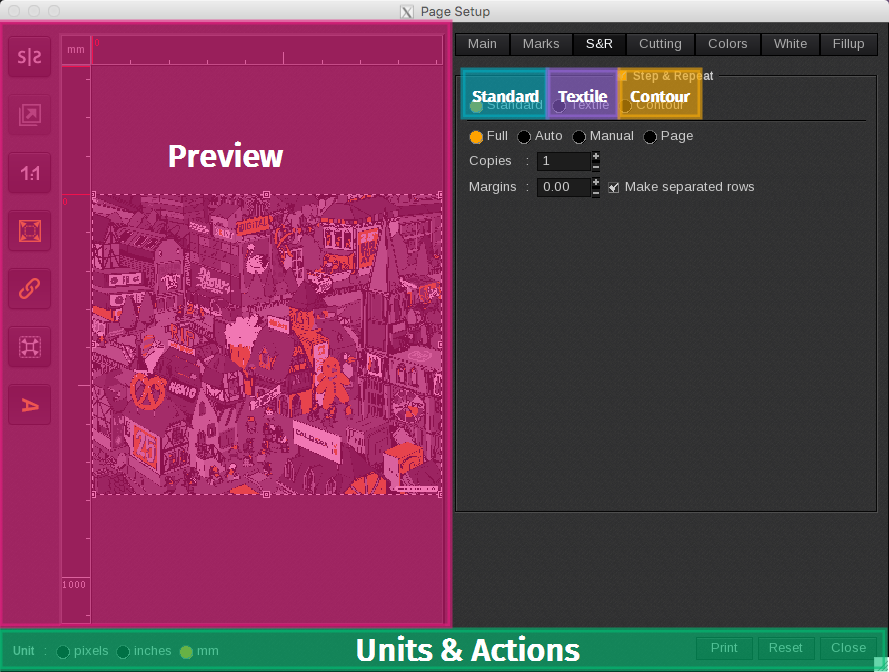
The S&R tab is the third tab listed on the Page Setup window. The Step&Repeat options allow you to print several copies of one image while optimizing their placement on the media. The S&R tab is divided into five areas:
- Preview (including image orientation, mirror effect…)
- Standard: uses a standard rectangular layout to optimize the placement of the copies.
- Textile: looks for the best drop to copy patterns
- Contour: uses the cut contour lines in the graphic to optimize the placement of the copies.
- Units & Actions
Note: Changes applied are dynamic and are immediately displayed in the preview section.
Additional feature:
- Nest as block: when enabled, nests the copies as a block as shown in the preview window for that print job. When disabled, the copies are nested independently along with other images.