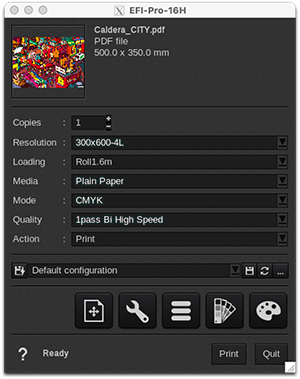
Resolution
- 300x600-4L
- 600x600-4L
- 900x600-4L
- 600x1200-4L
- 900x1200-4L
- 1200x1200-4L
4L: Refers to "4-Level color"
Loading
- Roll 1.6m
- Rigid 1x1 m
- Custom
Custom loading with EasySelect
EasySelect is the capability for CalderaRIP to use the size and type of loaded media in the printer.
This printer supports 1 level of selection:
- CustomLoading: uses a custom size (sheet or roll) defined at last moment in the Print module interface.
Media
- Plain Paper
This driver comes with only a default media not calibrated.
Discover how to manage media with EasyMedia by clicking here.
Mode
- CMYK
Quality
This device has a specific printing method, as well as a specific way of expressing the resolution/mode/quality of the prints. Therefore, the manufacturer's software comes with preconfigured print modes that allow different qualities to be achieved by combining the following settings:
-
Passes
- Extract. Also known as "pass multiplier"
- Direction. Can be unidirectional or bidirectional
- Carriage speed. Can be "high-quality" (standard speed) or "high-speed" (maximal speed)
Read more about EFI's printing method, in this dedicated article.
Quality options in the driver
|
|
|
|
Recommended printing modes
| Resolution to be selected in the driver | Quality to be selected in the driver | EFI's Print Mode (reference quality) |
|
300x600-4L |
Any of "1Pass" | Express |
| 600x600-4L | Any of "1Pass" | Distant |
| 900x600-4L | Any of "1Pass" | Production |
| 600x600-4L | Any of "3Pass" | POP |
| 600x600-4L | Any of "4Pass" | High Quality |
| 600x1200-4L | Any of "4Pass" | Ultra Quality |
Actions
The device supports only two actions:
- Print.
- Nest.
"Rip", "Rip then Print", and "Keep the ripped file" actions are disabled, as the "Print" action sends a RIP file to the controller-mounted directory. You can keep RIP files in the controller and manage to reprint them on the controller directly.