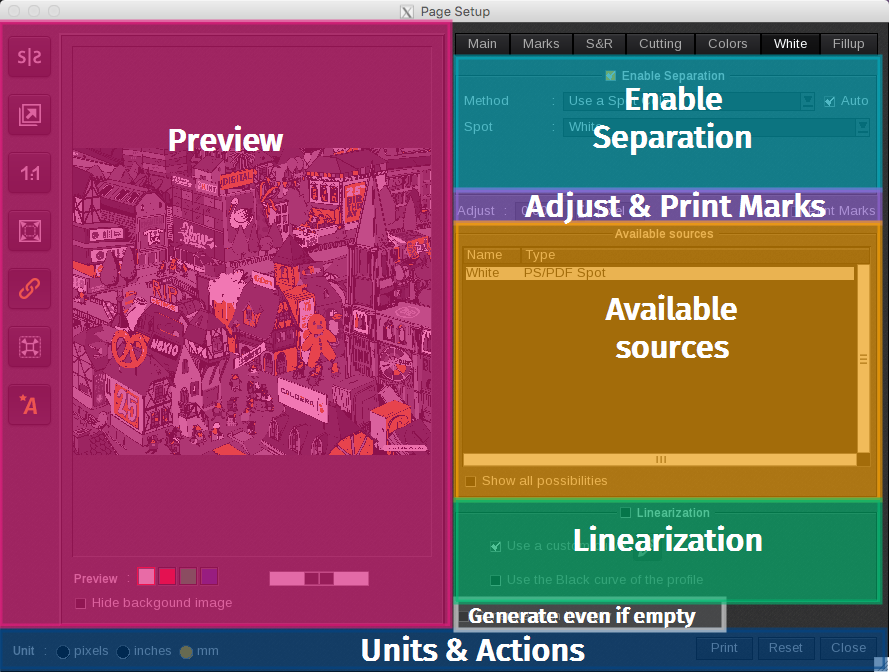
When your printer uses Spot inks, also known as Special Inks, such as White, Metallic, or Varnish, specific tabs are created in the Page Setup window. To enable the features associated with a particular tab or color, just check the "Enable Separation" box.
Good to know
These Spot or Special inks tabs can be managed in the ServerAdmin module.
To learn more about each section of the spot color tabs, click on the links to access the dedicated articles.
-
Preview: The Preview feature allows you to easily identify where the special ink is applied within the graphic.
- You can assign a color to the special ink from the following options: White, Red, Green, or Blue.
- To adjust the opacity of the selected color, use the provided slider.
- Additionally, you can select Hide the Background Image to display only the special ink in the preview.
- Enable Separation.
- Adjust & Print Marks.
- Available sources.
- Linearization.
- Generate even if empty.
- Units & Actions.