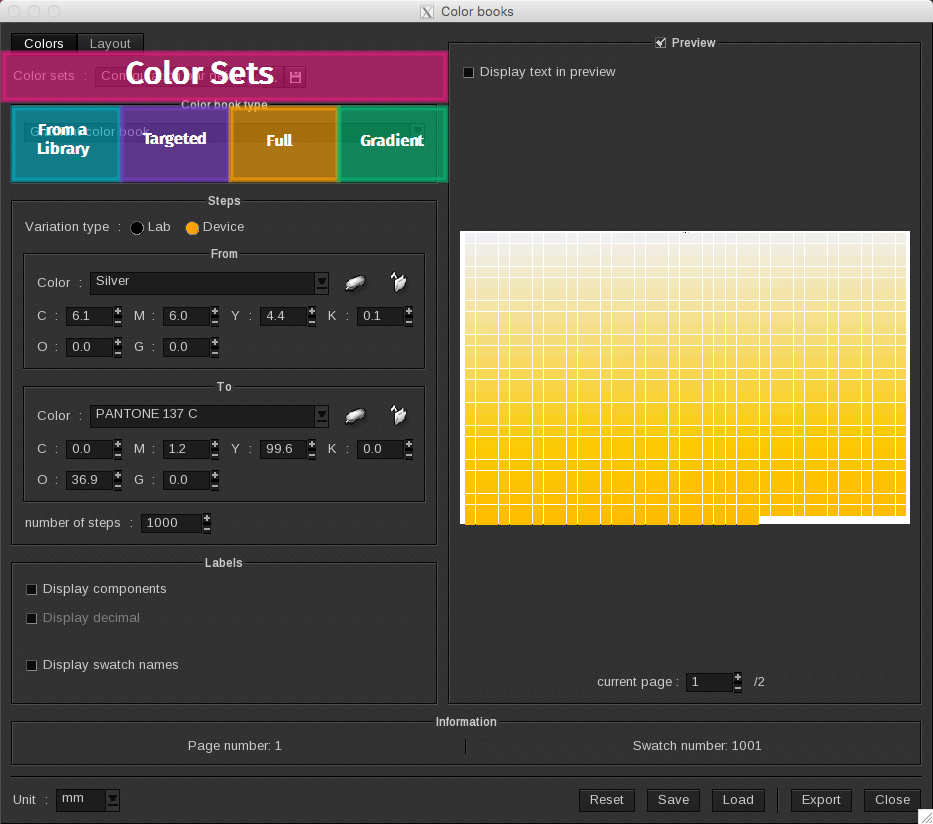
The Color tab is divided into four sections:
- Color Sets
- From a Spot Color library: the ColorBook will be made from the selected library’s spot colors only.
- Targeted ColorBook: the ColorBook focuses on a Targeted Color selected within the document’s spot colors. To help you choose the right components percentage for the target, it will vary the components around the colors.
- Full ColorBook: the ColorBook is generated from the printer’s full color gamut.
- Gradient ColorBook: the ColorBook will display a gradient between two selected colors.
Once a Color book type selection is made the Steps and Labels options will change accordingly.